Designing for Your Audience

August 13, 2008 by Eric Leuenberger  
Filed under Design & Usability

Over the past year or more I’ve listed a number of strategies that aim to help ecommerce store owners increase their website sales.

A portion of them involve changes to website design including proper placement of elements on the page.

In keeping with my previous post, I see a number of store owners implementing these strategies in the hopes of increasing conversion immediately yet they completely ignore the rest of their design. They end up wondering why the “changes” had little effect.

What do I mean?

Well, unless you design your website with your target market in mind, and have done your homework to find out the best plan of action on capturing that market, then simply adding a few elements in certain locations on a page won’t have the impact you hope for. If the rest of your website design misses the mark it will limit the results that can be achieved.

Sure, the changes in most cases should have a positive impact to some degree … or I wouldn’t mention them. But to really see a big impact, you have to also make sure your site is designed with your customer in mind.

A site designed in a “modern technical” style with the elements placed in proper locations when your market is antiques probably won’t have the most effective impact on sales. To get it right, the design should be custom. Taylor made to your specific business objectives and target market. It should be designed in response to answers received from very specific questions relating to both your business and your target.

Remember, conversion is a process not an event. Although making a few changes might help in the sort term, to sustain long term success you must continually test and refine your strategies. You must know your market and speak to them in a manner which persuades action. This includes through the graphics you use as part of your design.

The graphics, alignment, and color scheme help set the mood and tone of the website. If they don’t fit what market you are targeting then the results — although present — will be less than what you hoped for.

Keep that in mind the next time you are looking for a website design or website redesign hoping to increase sales. To get the design right, it must answer a series of questions that directly relate to your business, target market and demographic user otherwise it’s just a “design”.
Keeping Customers in the Checkout Process

August 12, 2008 by Eric Leuenberger  
Filed under Shopping Cart Abandonment

Moving customers through the checkout process effectively is a critical element toward closing any sale.

Throughout this process you will need to continually provide them with the necessary elements which ensure they feel comfortable enough to complete the action (i.e. buy your product.)

Checkout abandonment is a problem that all ecommerce sites see in some degree. The rate at which your visitors abandon depends on how effective you have structured the process. Once you get them started on it they may leave, but you don’t have to make it easy on them to do so. Some site owners are doing just that.

The Problem Revealed

There is an inherent problem I have seen on a number of ecommerce sites who’s owners attempt to provide their customers with the “right information” at the “right time” with the hopes of persuading them to complete the checkout. These sites oftentimes do a good job of placing the elements but fail in one other important area — how they present the information the element leads to.

The way this information is presented can either help or negate to some degree the intended effect. In the examples I have seen, the sites present the user with a hyperlink element linking them to a point of customer assurance which resides on a new page within the site. This can be a link to the shipping rate schedule, a guarantee, contact information, or more.

However, the way these sites have implemented the elements actually ends up taking the visitor further away from the checkout process — not what you want if you are trying to close a sale and win over a customer.

Implementation

For the past several months I’ve been testing the two methods against each other. One method uses hyperlink elements that “feed” customer assurance information to the visitor via a link to a new page, and the other feeds customer assurance information via a non-blockable DHTML hover box. The results were not surprising.

The method which utilized the DHTML hover over boxes had a positive increase on the website conversion in the areas it was utilized. In contrast, in instances where the information was fed to the user via links to other pages on the site (taking them away from the checkout process), the abandonment rates were higher and the conversion lower.

When asked, users attributed their abandonment to confusion relating to “how to get back into the checkout process” at the exact point they were at when they left it to view the “assurance” information.

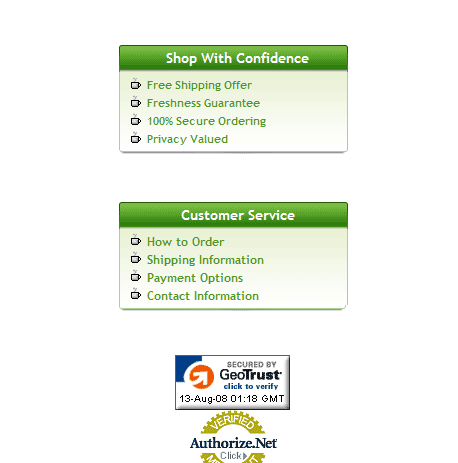
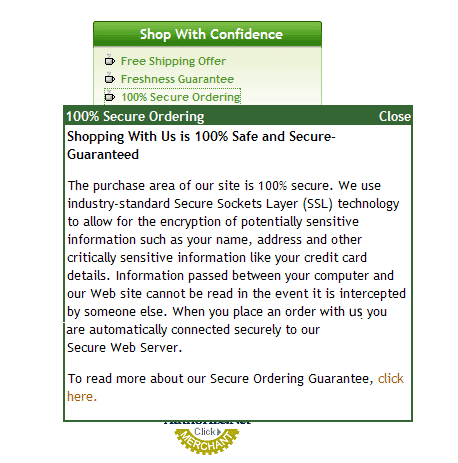
Below are two screenshots. Figure 1 shows the typical way I saw this method utilized on sites; with hyperlinks that took the user out to other pages in order to get the information they sought. Figure 2 shows the after effect using the more effective DHTML hover over box which gives the end user what they seek without taking them away from the checkout process.

Customer Assurance Links
Figure 1

Customer Assurance Links
Figure 2

Others have tried to circumvent the misfortune of leading users away from the checkout process by providing the information in a traditional “pop-up” window. Not a bad idea, but still not the best. Why? Because with the many pop-up blockers built into browsers now, these clicks may only frustrate them again.

The answer is to provide the information to them in a non-blockable DHTML hover over type window. You can even set these up to activate “on mouse over” if you wish which will present the information simply by hovering a mouse over the link.

You’ve now got yet one more tool to use in your quest for increased conversion. Use it wisely and you will be rewarded.

To your continued success.

« Previous Page