Facebook’s New Privacy Settings: What Does this Mean for You?
May 29, 2010 by Erin
Filed under Social Media
The social media world has been abuzz these past few weeks over Facebook’s recent unveiling of new privacy settings on its ever-growing popular social sharing site.
Facebook recently made the decision to allow different levels of privacy for its account users. From a “please just update my family members” option to a “let it all hang out” option, Facebook believed it had found a happy medium for those users who like to share a little or a lot.
Thanks to a few new Facebook APIs sites like Time and Pandora (among many others), are using new Facebook Connect-type options to allow brand fans to see what they have in common with other brand fans. Click on an article about The Fray on Time — plan to see all of Time’s other Fray Fans in the Facebook window.
As a e-commerce retailers, this could have some great implications. If you don’t already have a “see who else likes this” option on your site, these APIs could be the answer you’re looking for.
On the other hand, you could risk losing current or prospective buyers if they feel as though what they’ve bought or looked at won’t be kept private.
As a response to the new “lack of privacy” options, some Facebook users have taken down their pages, shuttered their accounts and returned to a Facebook-free world. Others are withholding information, such as which brands they like, while others are continuing on as if nothing ever changed.
What does that mean for you?
That all depends on what you’re doing with your Facebook brand page. You may notice a slight drop in fans due to the mass exodus of “We’re not going to take it” users. Then again, if Mark Zuckerberg is right and there really is no such thing as real privacy, you may start to see an increase in people liking your brand. Either way, I wouldn’t count on Facebook closing its doors any time soon. I also wouldn’t begin taking down my Fan/Brand pages anytime soon either.
Facebook appears to be having a bit of a midlife crisis right about now. Like any good partner, it’s best to just sit back and watch and intervene when things start to get out of control.
Subscribe Today and Start Winning More Customers
Gain valuable insights and strategies that will help you win over more customers and increase your sales.
Click here to Subscribe to my RSS feed.Should You Consider A Facebook Community Page for Your E-Commerce Website?
April 10, 2010 by Erin
Filed under Social Media
It wasn’t an April Fool’s Joke — when Facebook announced on April 1 that it would be introducing Facebook Community Pages, they really meant it.
For anyone that hasn’t heard of a Facebook Community Page, this new designation can used to create a page that is focused on a cause, a person, an idea, or a group. Sounds pretty similar to a Facebook Group or Fan Page, right?
Sort of.
Here’s a breakdown of Facebook’s offerings:
- A Facebook Fan Page: Best used to promote a brand, business, website, a person or a product/organization, Fan Pages are run by administrators whose identities are concealed. Fan Pages can include FBML (Facebooks special mark-up language) as well as numerous applications and can push out updates similar to a personal Facebook page.
- A Facebook Group: Best used for hobbyists or folks with similar interests. A Group is run by a single or group of Facebook users and the identity of said user(s) is shown on the group page. Groups can be private or public and do not allow for the same update push that Fan pages do.
- A Facebook Community Page: This new feature can be used in concert with a Fan Page. In fact, according to many of the Facebookerati, the Community Page functionality was put in place so that unofficial fan pages could exist. According to Facebook, if a Community Page generates enough fans/supporters, it can be adopted and maintained by the Facebook Community. (Think of it as a Facebook-platform wiki)
Still confused? Say you run an ecommerce site built around selling pet toys. Your Fan Page can and should represent your website. Now say you’re the creator of a charity we’ll call Fido’s Friends. Where you wouldn’t talk about the charity a lot on your Fan Page, you could create a Community Page and list all of your upcoming projects and fund-raising events.
Setting up a Facebook Community Page
Creating a Facebook Community Page is fairly easy. Head to http://www.facebook.com/pages/create.php and select the type of page you want to create. Facebook took the liberty of describing what each type of page is suggested for if you’re confused.
Once you’ve created your Community Page, you can add as much flair as you want. The functionality is very similar (if not identical) to a Fan Page, so you are able to add apps including the much-loved FBML.
Once you have customized your page, you will be able to promote it to friends like you would a Fan Page and continue to collect Community “Fans.”
Subscribe Today and Start Winning More Customers
Gain valuable insights and strategies that will help you win over more customers and increase your sales.
Click here to Subscribe to my RSS feed.5 Steps to View Your Facebook Fan Page Stats in Google Analytics
March 16, 2010 by Erin
Filed under Featured, Social Media, Website Analytics
If you’ve had a Facebook Fan Page set up for any amount of time, you may have noticed a little thing called Facebook Insights. This “tool” is reportedly Facebook’s answer to analytics.
Most SEO and social media consultants will feel compelled to tell you that Insights offers very little insight. Aside from who has commented on your updates and the age, gender and geographical breakdown of your fans, there isn’t much other insight Insights can provide.
Almost makes you wish there was a way to use Google Analytics to see how your Facebook Fan Page is doing doesn’t it?
I’m happy to report, after finding a hack produced by the folks at Webdigi, a London-based Web Development company, there is a way to set up your GA account to retrieve Facebook stats.
Here’s how:
- Assuming you already have a Google Analytics Account, set up a new website profile, titling the new profile “Facebook,” “Facebook/URL” or something you’ll know is your Facebook analytics. Be sure to find and copy the UA code provided once you set up the new profile. (the code will look something like UA-#######-#)
- Because Facebook allows for limited Javascript (whereas Google Analytics required a more robust use of Javascript), you’ll need to create an image of each Facebook page you want to track. Luckily, Webdigi has a Google Analytics link generator for Facebook pages (http://ga.webdigi.co.uk/) available for free use (thus far, this is the only tool available that I can find that does this sort of link generation for Facebook to GA).
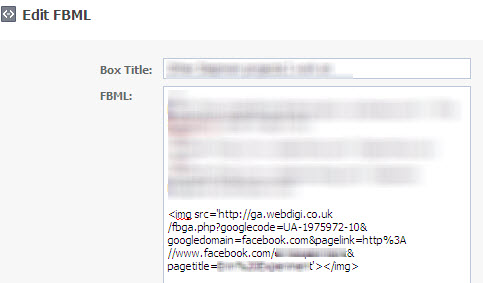
- Copy the entire Webdigi code provided into the part of the Fan Page you are tracking. (For instance, if you want to track your coupon tab, discount tab and special offers tab you’ll need a separate code for each page.) You’ll need to paste the code in an FBML on that page, below whatever HTML you may have used in the FBML (see image).
- To track your Facebook Fan Page Wall, you’ll need to create an FBML page which can be transferred into a box that appears on the left hand side of your wall. One of the best ways to do this is to post a list of resources or links, embedding the Webdigi below your HTML.
- Google Analytics will take approximately 24 hours to confirm your code and begin to report results. Once the checkmark appears next to the name you’ve designated for your Facebook Google Analytics, you will be able to measure metrics above and beyond what Facebook Insights provides.

Subscribe Today and Start Winning More Customers
Gain valuable insights and strategies that will help you win over more customers and increase your sales.
Click here to Subscribe to my RSS feed.Free Tools To Enhance Your ECommerce Website and Social Media Campaigns
January 11, 2010 by Erin
Filed under Design & Usability, Social Media
Subscribe Today and Start Winning More Customers
Gain valuable insights and strategies that will help you win over more customers and increase your sales.
Click here to Subscribe to my RSS feed.75 Words to Consider During Your Next Electronic Campaign
December 22, 2009 by Erin
Filed under Email Marketing, Marketing Strategies, Social Media
Social media and e-mail, for all of their popularity, can only offer so much reach to potential customers. You can have the perfect sale at the perfect time using the most pristine analytics possible but lose conversion because your message got lost along the way.
How can you be sure your message will get in front of as many eyes as possible?
- Consider using some of the most popular retweetable and repeatable words on Twitter and Facebook.
- Avoid words that will land your message in a customer’s spam filter
The 20 Most ReTweetable Words & Phrases (according to DanZarrella.com) are:
| you | please | |
| retweet | post | blog |
| social | free | media |
| help | please retweet | great |
| social media | 10 | follow |
| how to | top | blog post |
| check out | new blog post |
According to spam filter experts, there are at least* 55 words or phrases you want to avoid in your e-mails include:
| #1 | Accept credit cards | Affordable |
| All natural | Apply online | Bargain |
| Best price | Billing address | Buy direct |
| Call | Cards Accepted | Check |
| Click /Click Here / Click Below | Click to remove | Congratulations |
| Cost / No cost | Do it today | Extra income |
| For free | Form | Free and FREE |
| Free leads | Free membership | Free offer |
| Free preview | Full refund | Get it now |
| Giving away | Guarantee | Hidden |
| Marketing | Marketing solutions | Money |
| Name brand | Never | No Hidden Costs |
| No-obligation | Now | Offer |
| One time / one-time | Opportunity | Order / Order Now |
| Order today/ Order status | Orders shipped by priority mail | Performance |
| Please read | Price | Risk free |
| Sales | Satisfaction guaranteed | Save $ |
| Save up to | Special promotion | Urgent |
| US dollars |
You may obviously need to use some of the words above in your next e-mail, however, be sure to use the word(s) sparingly and never put a word like Free or Now in all capital letters. Increased frequency or repeated use of these words can highly increase your chances of an email landing in the spam folder.
Many third party email systems like Constant Contact, iContact, and AWeber automatically pre-check your email for you against a spam database and then give it a “spam rating”. The rating is supposed to help you gauge how your email stacks up against other spam and thus provide an idea of whether it will be caught in spam filters or not. I highly recommend one of these types of services if you are not already utilizing a third party system.
*This list was adapted from http://www.marketingforsuccess.com/wordstoavoid.html. For a list of 250 words and phrases to avoid, take a look at Words and Phrases that Trigger Some Spam Filters at http://www.wilsonweb.com/wmt8/spamfilter_phrases.htm
Subscribe Today and Start Winning More Customers
Gain valuable insights and strategies that will help you win over more customers and increase your sales.
Click here to Subscribe to my RSS feed.