NEW RELEASE! Export Shipping & Order Information version 1.2.1 Contribution

June 28, 2007 by Eric  
Filed under Zen Cart Contributions

Here we go. The next version of my Shipping and Order Export contribution is now ready for download.

Thanks for the valuable feedback on version 1.2.0.

A number of your concerns and questions have been address in this release, and a number of bugfixes have also been included for the previous version. So, if you have any previous version of my shipping modules, you’ll definitely want to download this one to get the most stable release.

Once again, I have reworked to allow more user flexibility.

A screenshot of the version 1.2.1 is below:
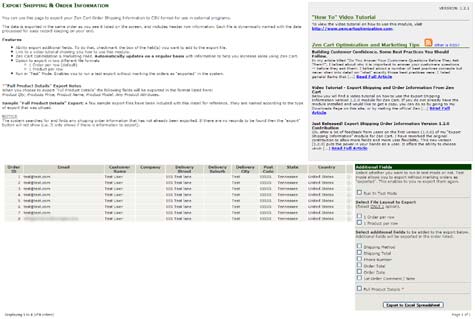
Zen Cart Export Shipping and Order information module contribution plugin

How to Download Version 1.2.1
You can download this new version by clicking here. You will be taken to my downloads page where you can select the new 1.2.1 version.

Bugfixes Included in Version 1.2.1

  1. Text qualifier (quote) ” added to eliminate records breaking to a new line when a comma was present (mainly in addresses).
  2. Corrected issues with multiple lines being exported when more than one comment was present for an order. Now only the first comment is exported with the list. This is typically the comment that the customer left while placing the order the first time.
  3. Corrected issues with order comments that span multiple lines throwing export off.

New Features for Version 1.2.1

  • Added the ability to export in two different file layout formats (”1 Order per row” OR “1 Product per row”)
  • Added “Test” feature. This enables you to run a test export without marking the orders as “exported” in the system. It can be handy if you want to export items and test import into other programs before you actually want them to be marked as “exported” (which removes them from future abilities to download). Once you are satisfied with your test, de-select that option, and export as normal. The orders will all export and be marked as “exported” so they will not show up in future downloads.
  • All product attributes are added to a single column and are separated by a pipe delimiter ” | “
  • Added header information and set number of columns to each export making it easier to import into other programs and analyze results.

Complete Contribution Features

  • Ability export additional fields relating to the order details itself (including individual products and associated attributes for an order). To do that, check mark the box of the field(s) you want to add to the export file.
  • Exclusive link to a video tutorial showing you how to use the module.
  • Built in Real-Time feeds from this site Zen Cart Optimization & Marketing to keep you up-to-date on all the latest information to help you increase sales using Zen Cart.
  • Ability to export in two different file layout formats (”1 Order per row” OR “1 Product per row”)
  • “Test Mode” feature. This enables you to run a test export without marking the orders as “exported” in the system. It can be handy if you want to export items and test import into other programs before you actually want them to be marked as “exported” (which removes them from future abilities to download). Once you are satisfied with your test, de-select that option, and export as normal. The orders will all export and be marked as “exported” so they will not show up in future downloads.
  • All product attributes are added to a single column and are separated by a pipe delimiter ” | “
  • Header information and set number of columns to each export making it easier to import into other programs and analyze results.

Upgrading from previous versions

For those of you upgrading from a previous version, simply overwrite all files from the previous version when asked. That’s all.

A link to a video tutorial on how to use this module can be found in the “Video Tutorials” section of this site.

Enjoy!

Post any comments or questions on the module below.

Building Customer Confidence. Some Best Practices You Should Follow.

In my article titled “Do You Answer Your Customers Questions Before They Ask Them?“, I talked about why it is important to answer your customers questions — before they ask them.

I talked about a number of best practices concepts but never when into detail on “what” exactly those best practices were.

I listed general items that build customer confidence and were called “customer points of assurance”.

In this article, I’ll go into a few of the items in more detail.

Customer Points of Assurance

What are customer points of assurance?

These are items that are strategically placed at various points during the customer buying cycle which “assure” them that the path they are on is not only correct, but is one that is safe, and will lead to a positive end experience.

Some example of customer points of assurance and suggested locations you should consider including them are as follows:

  • Store Phone Number (Call it “Customer Service Number” or “Customer Care Number”)

    Suggested location(s) – upper right corner of website in the header; on all product order pages.

  • SSL Certificate Seal

    Suggested Location(s) – On all pages, On all product pages, at all points in checkout where the customer is expected to give you “valuable or typically private” information.

  • Customer Service Links including: How To Order, Shipping Information, Payment Options, Contact Information

    Suggested location(s) – On registration page, on various spots throughout the checkout process.

  • Shop With Confidence Links including things like: Any special Offers, Any Guarantee’s, 100% Secure Ordering Links, Links to Privacy Policies

    Suggested Location(s) – On registration page, on various spots throughout the checkout process.

These list out a few of the main points you should at least cover in your store. All these items help build customer confidence and give you a better chance of helping them “complete the sale”. They are aimed at answering questions customers may have at precisely the point at which they typically ask them (remember you should answer them before they ask!)

My book “20 Ways to Increase Sales Using Zen Cart” goes into even more detail on these items. It shows actual screen shots of real life examples for better direction on where you should consider placing these items.

Until next time. Keep your customers happy, and keep the sales flowing.

Video Tutorial – Export Shipping and Order Information From Zen Cart

June 14, 2007 by Eric  
Filed under Uncategorized

Below you will find a video tutorial on how to use the Export Shipping Information version 1.2.0 module for Zen Cart.

If you do not already have the module installed and would like to get a copy, you can do so by going to my Downloads Page on this site, or by visiting the official Zen Cart downloads page and looking under the “Administration” category.

How to use this module to export shipping and order information from Zen Cart.


Just Released! Export Shipping Order Information Version 1.2.0 Contribution

June 14, 2007 by Eric  
Filed under Zen Cart Contributions

Ok, after a lot of feedback from users on the first version (1.0.0) of my “Export Shipping Information” module for Zen Cart, I have reworked the original contribution to allow more fields and more user flexibility.

This new version (1.2.0) puts the power in your hands as a user. It offers the ability to choose which fields you want included in your export with the standard fields being those that relate to shipping address information (as in the previous version).

Many users expressed interest in also having individual order information exported with each run. This is now included in version 1.2.0. By including this I had to exclude the first row of header information in the export that was in previous versions.

For those that do not need that functionality, you you still have the ability to export only the information that the previous version did, so it won’t affect you any, but again, it does give you some added features you may want to consider if and when the time is right for your store.

A screenshot of the version 1.2.0 is below:

Zen Cart Export Shipping and Order information module contribution plugin

How to Download Version 1.2.0
You can download this new version by clicking here. You will be taken to my downloads page where you can select the new 1.2.0 version.

New Features for Version 1.2.0

  • Ability export additional fields relating to the order details itself (including individual products and associated attributes for an order). To do that, check mark the box of the field(s) you want to add to the export file.
  • Exclusive link to a video tutorial showing you how to use the module.
  • Built in Real-Time feeds from this site Zen Cart Optimization & Marketing to keep you up-to-date on all the latest information to help you increase sales using Zen Cart.
  • and more ….

Upgrading from previous version 1.0.0

For those of you upgrading from a previous version, simply overwrite all files from the previous version when asked. That’s all.

A link to a video tutorial on how to use this module can be found in the “Video Tutorials” section of this site.

Enjoy!

Post any comments or questions on the module below.

Do You Answer Questions Before Your Customers Ask Them?

June 11, 2007 by Eric  
Filed under Conversion, Marketing Strategies

Do you ever notice that you have very little sales from your web store, but always seem to be answering questions from your customers asking you “how they can buy”, or asking questions about your store policies, or maybe it’s a question about a single product?

Customers Online will naturally have questions.Your answer is probably “No, I don’t?”

Do you know why you aren’t answering those questions?

Because your potential customers are leaving. Now, I here you. You are probably thinking “ah, yeah, that’s not hard to see, tell me something I don’t already know”. Well, I just did. Let me say it again, but in a different way.

“Your customers are leaving because you are not answering their questions!”

Now, does it make more sense?

Every potential customer has questions they need answered before they feel comfortable buying. These questions are not always “heard”, but are most often “silent” in nature. They reside in the customers head, and are one of the many barriers you face when convincing them “why to buy from you” instead of another seller. They may be silent, but they are real, and they are there.

They live within every visitor that wants to become a customer. If you don’t answer them, they will leave and you will lose the sale.

So how do you answer someone that hasn’t actually “asked” a question yet?

Simple, you answer them BEFORE they ask it!

You answer by placing the proper information in front of them at precisely the right time for where they are in their buying cycle. By doing this, any questions they have will be answered (before they ask them), and rather than leaving the site, you’ll increase your chances of them not only staying, but buying from you.

It’s called “building customer confidence”. It includes things like:

  • Customer points of assurance
  • Proper calls to action
  • Providing store policies
  • Secure logos in the right spots
  • and more…

“Customer confidence” goes a long way toward increasing sales.

So, how do you answer them if you don’t know what they are asking?

One way is to put yourself into their position — become a customer yourself (I’ll give you some actual examples in another article, but this article is to get your mind thinking like a “customer” — one of the first steps to increasing sales).

Think about what you look for, and at what times you look for it when you are attempting to make a purchase from the internet. What makes you feel comfortable enough to buy from an online store? Really think about it, and pay close attention the next time you shop online to what you ask, when you ask it, what you look for, and when you look for it.

This forces you to think of things from a “visitor’s / customer’s” perspective (which is how you should be looking at it if you want to increase conversion anyhow). If you are asking it, your visitors are probably asking it too! So, the next time you shop online, pay close attention to your thoughts and movements. Then go back and check your own web site for the same things you looked for (in the same locations) which helped make you feel comfortable in deciding to buy.

If you are missing those items, you’re missing sales.

In my next post I’ll actually go into a number of “best practice” items you should make sure you include on your site, and the general location of where would be best to include them (although this may differ based on your site, target market, and visitor demographic).

Until then, think like a customer and find out where your site needs to start answering their questions.

Next Page »