The psychological effect of color on the mind is powerful. It drives your mood, perception, your likes and dislikes. As a human, colors effect is programmed into you, and you really have little to say about it.
We know colors can provide visual appeal and influence buyer behavior. Use them properly and you can reap rewards, use them wrong and you could be sending a message to your visitors to stay clear.
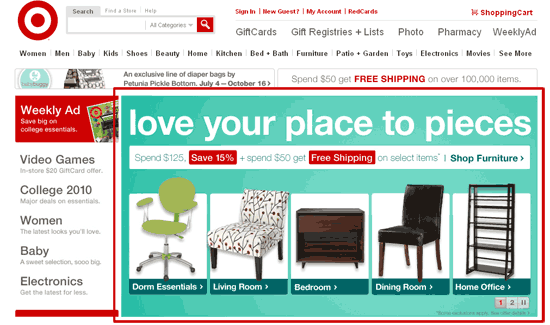
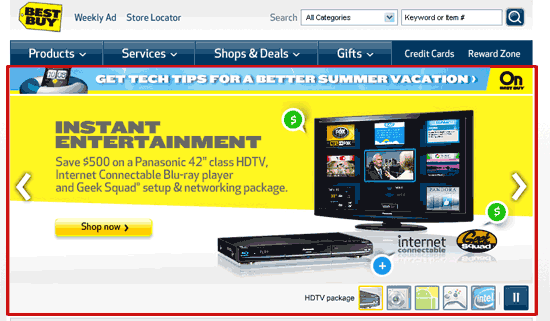
For many years, mountains of market research have been performed to identify various colors and color combinations along with the likely effect they have upon shopping habits. Big retailers spend millions on to testing colors effect on consumers because they know it has a huge affect on how their products are perceived. A look at some of the top retailers online might show some strikingly similar uses of color.
Keep in mind that although it would be a good bet the top competitors have a firm line on what works and what doesn’t when it comes to color, it should be noted that simply duplicating those with the thought it has to work is not the best idea. The effects of color differ among different cultures. As a result, the attitudes and preferences of your specific target audience should be taken into careful consideration while planning the design of any promotional materials.
Now let me ask you a few simple questions. When you designed your website, what colors did you use? Did you choose your colors because you liked them, because your designer said to use them, or for some other reason? Did you consider your target market and product before you considered a color combination?
The colors you chose influence visitors arriving to your site this very moment –whether it influences them positively or negatively depends on the color selection you ended up with (and even that should be continually tested.)
For example, studies show that impulse shoppers tend to respond best to red-orange, black and royal blue colors while shippers who plan and stick to a specific budget respond best to pink, teal, light blue and navy. Traditionalists respond to pastels such as pink rose and sky blue.
With this in mind, it should be no surprise that red is most often used in conjunction with sales and promotions. Why? First and foremost, red draws attention. Secondarily, a good promotion typically creates a feeling of urgency (adding a time limit to the promotion really drives this point home) and need or desire (red is often associated with passion or excitement.) Thus the red helps drive home the need for ‘immediate action’ (impulse) in the mind of the consumer—in turn, increasing response.
Red is a good color choice to use for just about any site when it comes to promotions. However, designing a site that is compromised primarily of red colors when you are trying to sell products relating to children is probably not the best idea. Have you ever noticed that toys, books and children’s web sites (not ecommerce) usually contain large blocks of bright, primary colors? Young children prefer these colors and respond more positively than they do to pastels or muted blends. But in ecommerce, developing a site based primarily on these colors because kids like them would miss the target. The children are not the ones shopping the site. Their parents and grandparents are.
So with that in mind, you might be selling books for children but you are marketing to grandparents and parents. The books you sell might be designed in bright, primary colors (reds, blues, yellows) to appeal to the children who use them. However, your marketing materials (including the website) should be designed with grandparents/parents in mind and thus you might decide to go with blues (trust, reliability), pinks (nurture, sweet, security) and yellows (happy, playful) as your pallet of choice.
On the other hand, if you run an adult website you may want to consider reds and blacks as they are thought to convey sexual connotations (a full list of colors and their effects on mood is presented below.) But never overdue it on one color as doing so can completely reverse the impact subtle use could have.
Take for example the colors black, gray and silver. Black on a site in the right locations can convey a sense of luxury. Silver conveys prestige, and gray—sophistication and affluence. Ever notice that luxury cars in commercials are often gray? The reason is because we know from studies that gray is associated with affluence. So when you see a Lexus in some commercial they don’t even have to use the word affluence in the script, simply showing the car in that color gets the message across.
Having said that, let me ask you how many ecommerce sites you arrive at that use black backgrounds in conjunction with heavy black elsewhere? I suspect not many. This is because overuse of one color can sometimes have the opposite effect. Using the luxury car example and taking into consideration the attitudes, preferences, and status of the target market in question, an overuse of black would make the site appear unprofessional, hard to read, and dark—not the message you intended, and certainly not the message your target audience is looking for. In this case, overuse of color may cause what could have been an otherwise qualified prospect to be turned off and leave.
Below I’ve listed a number of colors that are associated with certain qualities or emotions in North American mainstream culture. Use this as a guide to your own marketing.
Red: Excitement, Strength, Sex, Passion/Love, Anger, Vigor, Danger
If you want to draw attention, use red. It is often where the eye looks first. Red is not a good color to over use but using a spot of red in just the right locations(s) is smart in most cases.
Yellow: Knowledge, Joy, Intellect, Youth, Happiness, Energy, Warmth, Sunshine
Green: Fertility, Wealth, Healing, Success, Growth, Nature, Fresh, Relaxation, Abundance
White: Purity, Healing, Perfection, Clean, Virtue, Mild
Look at the colors of various soap products. You see a lot of white. You wouldn’t likely be drawn to buying soap that was black in color—even if it did clean your clothes.
Blue: Knowledge, Trust, Wisdom, Dependability, Reliability, Tranquility, Calm, Peace, Cool
Blue is often listed as the most popular color. Other conveyed meanings are steadfastness, and loyalty.
Black: Fear, Secrecy, Formal, Luxury, Sophistication, Elegant, Seductive
Black is a serious color that evokes strong emotions; it is easy to overwhelm people with too much black so be careful when using it.
Purple: Royalty, Wisdom, Spirituality, Dignity, Imagination
Orange: Creativity, Invigoration, Unique, Stimulation, Playfulness, Warmth, Vibrant
Orange is often used to make products that are high priced look more inviting—stimulate—because psychologically it makes them seem more affordable.
Gray: Balance, Sophistication, Affluence, Neutrality, Uncommitted
Too much gray will lead to feelings of mostly nothing; but a touch of gray can add a rock solid feel to your product.
Pink: Soft, Sweet, Nurture, Security
Gold: Prestige, Expensive
Silver: Prestige, Cold, Scientific
So how can you put this information to use? I’ve provided a short guide below to get you started.
Quick Guide to Marketing thru Color
1. Know Your Market
What culture are they? What race are they? Are they young? Old? High income? Low income? Male or female? You’ll need to speak their color language to build a relationship.
2. Research the Market
Market research and testing is of vital importance. If you are serious about maximizing your profits, research your target market’s color responses. Design several versions of the site, and test those designs on the target market.
Also, solicit feedback and make changes if needed. Your aim is to use colors to build a website with which your target market relates.
3. Watch the Top Retailers
Top online retailers spend millions on color research so you don’t have to. Watch the top selling etailers to see any emerging trends.
4. Use Safe Colors
Unless you’re dealing with an already strong brand, stick with safe colors. Trying to develop a new brand around colors that don’t traditionally work in selling isn’t the best idea.
So you see color has a much broader impact than one might believe on the ability to sell your product. Keep with the marketers mind and remember to continually test everything. I’ve seen a simple change of color on an “add to cart” button (keeping all other elements constant) have a positive impact on the conversion rate (in this case adding the item to the cart) and result in higher sales (providing the checkout process is setup to close the sale.)
When you look at your website and marketing materials what message is it sending to your target? Do the colors portray the image and message you intended or is there something else being said?