75 Words to Consider During Your Next Electronic Campaign

December 22, 2009 by Erin  
Filed under Email Marketing, Marketing Strategies, Social Media

Social media and e-mail, for all of their popularity, can only offer so much reach to potential customers. You can have the perfect sale at the perfect time using the most pristine analytics possible but lose conversion because your message got lost along the way.

How can you be sure your message will get in front of as many eyes as possible?

  1. Consider using some of the most popular retweetable and repeatable words on Twitter and Facebook.
  2. Avoid words that will land your message in a customer’s spam filter

The 20 Most ReTweetable Words & Phrases (according to DanZarrella.com) are:

you twitter please
retweet post blog
social free media
help please retweet great
social media 10 follow
how to top blog post
check out new blog post  


According to spam filter experts, there are at least* 55 words or phrases you want to avoid in your e-mails include:

#1 Accept credit cards Affordable
All natural Apply online Bargain
Best price Billing address Buy direct
Call Cards Accepted Check
Click /Click Here / Click Below Click to remove Congratulations
Cost / No cost Do it today Extra income
For free Form Free and FREE
Free leads Free membership Free offer
Free preview Full refund Get it now
Giving away Guarantee Hidden
Marketing Marketing solutions Money
Name brand Never No Hidden Costs
No-obligation Now Offer
One time / one-time Opportunity Order / Order Now
Order today/ Order status Orders shipped by priority mail Performance
Please read Price Risk free
Sales Satisfaction guaranteed Save $
Save up to Special promotion Urgent
US dollars    


You may obviously need to use some of the words above in your next e-mail, however, be sure to use the word(s) sparingly and never put a word like Free or Now in all capital letters. Increased frequency or repeated use of these words can highly increase your chances of an email landing in the spam folder.

Many third party email systems like Constant Contact, iContact, and AWeber automatically pre-check your email for you against a spam database and then give it a “spam rating”. The rating is supposed to help you gauge how your email stacks up against other spam and thus provide an idea of whether it will be caught in spam filters or not. I highly recommend one of these types of services if you are not already utilizing a third party system.

*This list was adapted from http://www.marketingforsuccess.com/wordstoavoid.html. For a list of 250 words and phrases to avoid, take a look at Words and Phrases that Trigger Some Spam Filters at http://www.wilsonweb.com/wmt8/spamfilter_phrases.htm
The How-to and Why of Twitter Lists for Ecommerce Retailers

Twitter’s recently added list functionality has turned the social networking site into a list-maker’s paradise.

If you’re asking yourself what the point is or why use a Twitter list if you’re an ecommerce retailer, then you’ve come to the right place. Below, you’ll find a brief introduction to Twitter lists as well as reasons why web retailers might want to use them.

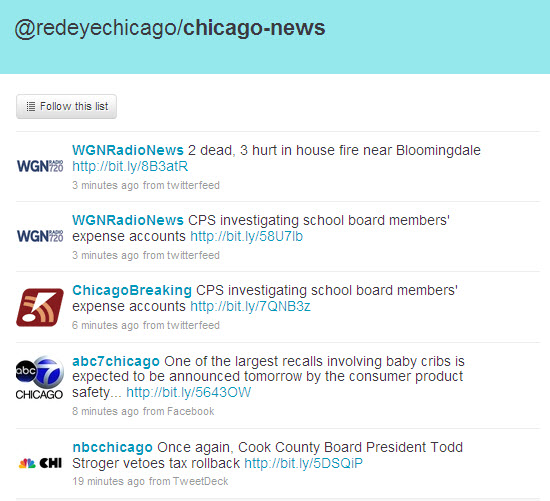
Twitter-List-1 What are Twitter Lists and how do you use them?
In the simplest definition, Twitter lists are a way to organize – into lists — brands, associations or people you want to keep together in a group. You can put together up to 20 lists containing up to 500 users each of whomever or whatever you choose.

Creating a Twitter list is fairly simple. Using my own Twitter account, we’ll create a list for my Chicago Tweeps (that’s Twitter People for those not up on the Twitter lingo).

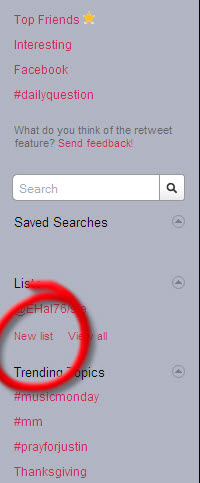
Once you’ve logged into your account, find “New List” on the right column.

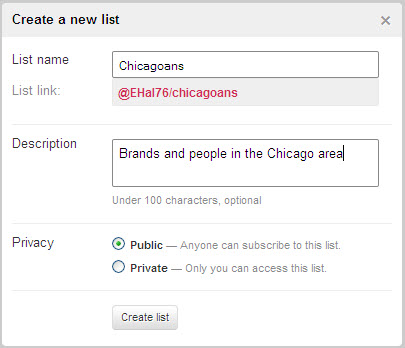
Once the dialogue box appears, begin typing the name of your list. This name is unique to you in that it’s attached to your Twitter profile name. You needn’t worry about copying someone else’s list name.

You may include a description with your Twitter list if you so choose. This might be helpful if you choose to make your Twitter list public or if you need to remember why you put the list together in the first place.

Finally, choose whether you want to make your list public or private. If you choose the public option, other Twitter users will be able to see who you have on your list. If you choose private, only you will be able to see who is on your list.

Twitter-List-2

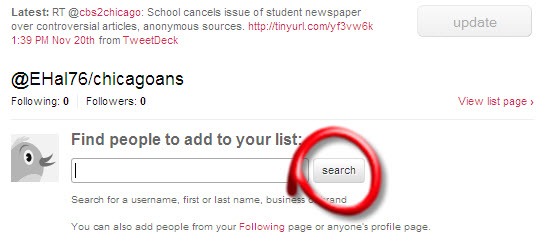
Once your list has been created, you can now start to add people to it.

There are several options for adding people.

You can use the search function:
Twitter-List-3

You can search for Twitterers you follow (click on the ‘list’ icon and check the list you’d like to add them to.)
Twitter-List-4

You can search using other Twitterers’ lists. To do this, click on their list(s) in the right column to open up a list. Select individual Twitterers to follow or choose “Follow List”

If you chose to follow another Twitter’s list, the list will be added to your list of lists in the right column.

Twitter-List-5

Why would you want to use Twitter Lists as an Ecommerce Retailer?

Twitter lists are a great way to organize the people you do business with. If you’ve been on Twitter for any amount of time, you’ll notice that it can be cumbersome to find and follow specific users you may consider important.

Twitter lists allow you to organize those users into easy-to-follow screens.

Say you have 900 followers. A third of your followers are customer-based; another third are vendor-based and the final third are industry-based.

With 900 followers, you’d have to be on Twitter all day long just to keep up with everyone. With Twitter lists, you can segregate your customers from your vendors and industry experts and concentrate on a specific group of Twitterers.

With Black Friday coming up, wouldn’t it be a great idea to call attention to your loyal customers (whom you have showing on a public customers list) and give them all a discount? Same goes for your vendors. If you love Paypal and your newsletter software so much you wish you could marry them both, why not give them the attention they deserve by pointing your followers in the direction of your vendor list.

A Few Simple Tricks To Make Your Site More Social Media Friendly

May 2, 2009 by Erin  
Filed under Social Media

Whether or not you’re on social media platforms or not, odds are you’re customers are. They’re sharing your URL with their friends on social networking sites like Facebook, Twitter, LinkedIn or MySpace.

If you want to engage in social media marketing, you’ll want to be sure to have a social media presence on your e-commerce site.

Social Media Sharing
There are dozens of sites you can visit that will provide embeddable code which can be used to create social networking icons on your site. These icons make it easy for visitors to share what they like about your site with their social media friends and followers.

A couple of sites worth checking out are ShareThis (http://sharethis.com). ShareThis is a tool you can install on your site that makes it easier for visitors to share with their network. You’ve probably seen some form of ShareThis on news sites. There are typically several icons spread out in a horizontal line or grouped together under a header of “Share.” Installing this tool lets your visitors easily spread the word via social networking sites about a page or website – yours – they like.

Add This (http://www.addthis.com/bookmark.php) is very similar to ShareThis. Both require site registration and a little publisher information, but both are also easy to use and do basically the same thing.

Show off your Social Media presence
If you’re on several social networking sites, it behooves you to display them somewhere on your site. For the consummate online shopper, these links show you’re not just an e-commerce beginner. The more sites you’re a part of, the more web-knowledgeable you look.

You can display your social media links either in self-created sidebar module or by using sites like Lijit (http://www.lijit.com). Lijit is similar to ShareThis; however, rather than pushing people out social networking sites, Lijit pulls them into your other sites.

« Previous PageNext Page »